星期四, 3月 05, 2026

iCluster Message Categories


This is a brief description of the main categories of iCluster messages by message prefix.

CSI - messages dealing with IBM Cluster Resource Services and group, node, object specifier etc, configuration

DMK - communications API messages (TCP/IP, sockets. ports)

HAB - messages dealing with IFS (BSF) replication

HAD - messages dealing with PF-DTA and LF (i.e. database file) replication

HAM - Status Monitor messages

HAS - roleswitch and node heartbeat polling messages

HAX - staging store messages

HMO - history monitor messages

OMI - general replication messages, replication of non-journaled objects

SCI - sync check messages

XDMCLUSTER subsystem job


Primary Node Jobs 
JOB
FUNCTION
DESCRIPTION
NO OF JOBS
DMCHATL
DMCHATL
TCP/IP Listening Job
1
DMM00000MO
DMCHAMO
Monitor Information out
1
DMS0xxxxCI
DMCHACI
Control information in
1
DMS0xxxxCO
DMCHACO
Control information out
1
DMS0xxxxDO
DMCHADO
Data out
1
HAMON
OMSM
Process monitor request on source
1
Groupname
OMGROUPJOB
Scrapes audit journal for object only
1
Groupname
HADDAS
HA Data Audit Scrape - Scrapes audit journal for data information
1 per group
Groupname
HADDJS
HA Data Journal Scrape - Scrapes data journal
1 per journal per group
Groupname
HADSFP
HA Data Save File Process
1 per journal per group
DM_DEFMGR
DM_DEFMGR
Definition Manager
1 per active node
DM_MONITOR
DM_MONITOR
Definition Manager Helper job
1 on master node only
DM_GRPSTS
DM_GRPSTS
Processes message requests such as group and node status
1 per active primary node
Secondary Node Jobs 
JOB
FUNCTION
DESCRIPTION
NO OF JOBS
DMCHATL
DMCHATL
TCP/IP Listening Job
1
DMM00000MO
DMCHAMO
Monitor Information out
1
DMS0xxxxCI
DMCHACI
Control information in
1
DMS0xxxxCO
DMCHACO
Control information out
1
DMS0xxxxDI
DMCHADO
Data in
1
Groupname
OMRCV
Receives object only entries and sends to stage area
1
Groupname
OMTARGET
Applies object changes
1 per group
Groupname
HADDASR
HA Data Audit Scrape Receiver - Receives audit journal for data information from HADDAS
1 per journal per group
Groupname
HADDJSR
HA Data Journal Scrape Receiver - Receives data journal info from HADDJS and send it to stage area
1 per journal per group
Groupname
HADSFPR
HA Data Save File Process Receiver - receives save files from HADSFP and sends to stage area
1 per journal per group
Groupname
HADTUP
HA Transaction Update Process - match and merge process
1 per journal per group
DM_DEFMGR
DM_DEFMGR
Definition Manager
1 per active node
DM_MONITOR
DM_MONITOR
Definition Manager Helper job
1 on master node only
DM_GRPSTS
DM_GRPSTS
Processes message requests such as group and node status
1 per active primary node
If you have iCluster system value for using OS/400 Cluster Services specified as *YES, you will see the following jobs listed in the QSYSWRK subsystem.
QSYSWRK Jobs 
JOB
FUNCTION
DESCRIPTION
NO OF JOBS
Groupname
QCSTCRGJOB
OS/400 cluster resource group jobs
1 per group
DM_INTGRP
QCSTCRGJOB
OS/400  cluster job for definition manager
1
QCSTCRGM
QCSTCRGMA
OS/400  cluster resource group manager job
1
QCSTCTL
QCSTCCJOB
OS/400 cluster control job
1
QTOGINTD
QTOGINTD
Internet Daemon Server
1

星期一, 2月 05, 2024

IBM i SSH


Video


Configuring the IBM i SSHD Server to Use Public-Key Authentication


Configuring the IBM i SSHD Server to Use Public-Key Authentication

HOW TO CONFIGURE AND USE SSH ON IBM i


HOW TO CONFIGURE AND USE SSH ON IBM i

Batch SFTP Download Example Using Password Authentication

 Batch SFTP Download Example Using Password Authentication

https://www.ibm.com/support/pages/batch-sftp-download-example-using-password-authentication

Troubleshooting


Problem

This technical document describes how to use password authentication with SFTP.

Resolving The Problem

Prerequisites

57XXSS1 Option 30 (Qshell)

57XXSS1 Option 33 (Portable Application Solutions Environment)

5733SC1 Options *BASE & 1 (IBM Portable Utilities for i)

Assumptions

  • A user profile to run the batch SFTP process exists on the LPAR.
  • A home directory in the IFS exists for the user profile that is running the batch SFTP process.
  • The home directory parameter in the batch SFTP user's profile contains the absolute path to its home directory.
  • The SFTP server's public host key is stored in the known_hosts file in the batch SFTP user's .ssh directory.
 

The primary components for a batch SFTP procedure that use password authentication is as follows:
 

  1. Password Shell Script
  2. Batch SFTP Shell Script
  3. CL Program
 
Caution: The following batch procedure example is provided on an unsupported, AS IS basis. The preferred method for batch mode transfers is public key authentication. The use of a private and public key pair for user-based authentication is more secure than a password. For batch connections that require password authentication, the procedure in this document describes how to submit a password to remote SFTP servers. The following example provided can be used as a guide to help implement password authentication with SFTP.
Step 1 - Create Shell Scripts

QSH CMD('/QOpenSys/usr/bin/touch /QOpenSys/etc/openssh_password_script.sh')

QSH CMD('/QOpenSys/usr/bin/touch /home/sftpuser/batch_sftp_script.sh')
 
Step 2 - Change Owner Of The Shell Scripts To The Batch SFTP User Profile

QSH CMD('/QOpenSys/usr/bin/chown sftpuser /QOpenSys/etc/openssh_password_script.sh')

QSH CMD('/QOpenSys/usr/bin/chown sftpuser /home/sftpuser/batch_sftp_script.sh')
 
Step 3 - Change IFS Authorities On The Shell Scripts

QSH CMD('/QOpenSys/usr/bin/chmod 755 /QOpenSys/etc/openssh_password_script.sh')

QSH CMD('/QOpenSys/usr/bin/chmod 755 /home/sftpuser/batch_sftp_script.sh')
 
Step 4 - Build Password Shell Script

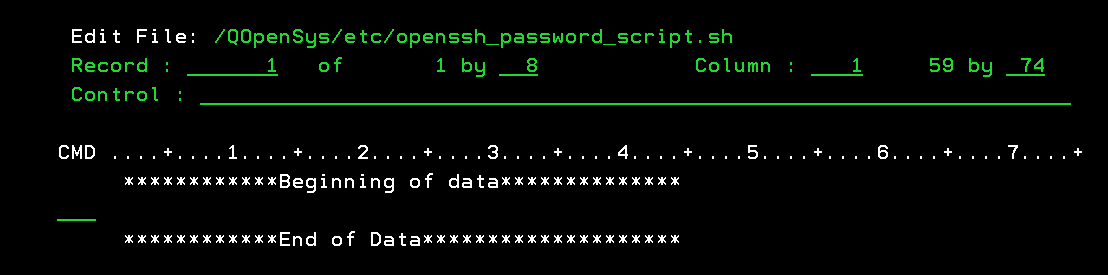
EDTF '/QOpenSys/etc/openssh_password_script.sh'


Press F15 to enter the Edit File Options Screen.

The password shell script must have UNIX-style line ends (LF) at the ends of lines rather than (CR/LF) like on Microsoft Windows-based machines.

Entering option 5 on the Selection line and then specify *LF for the Stream file EOL option to append a line-feed at the end of each line in the file.


Press the enter key for the EOL change to take effect.

Press F3 to exit the Edit File Options screen.

Store the password for the user account that the SFTP server administrator provided in the password script file.


Note: The prefix area in the CMD column is used for entering edit commands. For example, typing In can insert n blank lines after the record. Conversely, you can use Dn to delete the current line and the next n-1 lines or D to delete one line.

Here's a brief description of each record in the password script file:

#!/bin/sh -> Specifies the shell that interprets commands in the script file.

printf -> Prints the password for the user account that the SFTP server administrator provided to transfer files.

Press F3 to Save and Exit the password shell script.
 
Step 5 - Build SFTP Script To Download Files Programmatically


EDTF '/home/sftpuser/batch_sftp_script.sh'


Press F15 to enter the Edit File Options Screen.

The batch sftp shell script must have UNIX-style line ends (LF) at the ends of lines rather than (CR/LF) like on Microsoft Windows-based machines.

Entering option 5 on the Selection line and then specify *LF for the Stream file EOL option to append a line-feed at the end of each line in the file.


Press the enter key for the EOL change to take effect.

Press F3 to exit the Edit File Options screen.

The batch sftp script file is used to transfer files with a remote system programmatically.


Note1: The prefix area in the CMD column is used for entering edit commands. For example, typing In can insert n blank lines after the record. Conversely, you can use Dn to delete the current line and the next n-1 lines or D to delete one line.

Here's a brief description of each element in the batch sftp script file:

#!/bin/sh -> Specifies the shell that interprets commands in the script file.

export DISPLAY= SSH_ASKPASS=/QOpenSys/etc/openssh_password_script.sh -> Sets the $DISPLAY and $SSH_ASKPASS environment variables in the batch script file. The SSH_ASKPASS environment variable provides the location of the password shell script.

printf -> Prints the string of characters that are to be piped to the sftp command.

"get /home/milbank/vpncfg.txt\nquit\n" -> Downloads file "vpncfg.txt" to the batch SFTP user's home directory in the IFS.

serverUserID@server -> Specifies the user profile and remote SFTP server.

serverUserID -> The user profile that the SFTP server administrator provided to transfer files.

server -> The IP address, Hostname, or Fully Qualified Domain Name of the SFTP server.
Note2: On OS releases 7.5+, the SSH_ASKPASS_REQUIRE environment variable needs to be added to the export line.
Here's an example of the export line on 7.5+ systems:
image-20230713100705-1

Press F3 to Save and Exit the batch sftp shell script.
Step 6 - Sample Batch SFTP CL Program


The CL program invokes separate Qshell calls to execute the commands in the password & batch sftp script files.


Note: The IFS paths that include QOpenSys in the CL program example is case-sensitive.